The MetaStock Guide · Updated August 2026
MetaStock rewards people who learn it deliberately and frustrates people who poke at it. This guide is the deliberate path: six steps, in order, from a fresh install to a daily routine you actually run.
WORKS THROUGH METASTOCK 20 · FULL TRIAL VERSION · CANCEL ANYTIME
Before you install
Before the download, settle two things. First, check your machine: MetaStock 20 is Windows 10/11 (64-bit) software, and the system requirements page covers what that means in practice, including running it on a Mac. Second, know which edition you are trialling toward: D/C (end-of-day, for people who analyse after the close) or R/T (real-time, for intraday traders). If you are not sure, start with the assumption of D/C; most private traders live there happily, and the R/T page explains who genuinely needs the real-time tier.
The 30-day trial is the full version, so everything in this guide works during the trial. The download walkthrough covers the signup screens themselves if you want hand-holding through those.
Step 1
Installation is an ordinary Windows installer: run it, accept the defaults, and let it finish. The first thing you see on launch is the Power Console, MetaStock's unified workspace, and it is worth ten minutes of orientation before you click anything ambitious. The Power Console is the hub the whole program radiates from: it is where you open charts, run scans, launch the System Tester, and manage your lists of securities. Early versions of MetaStock scattered these across menus; in MetaStock 20 they sit in one place.
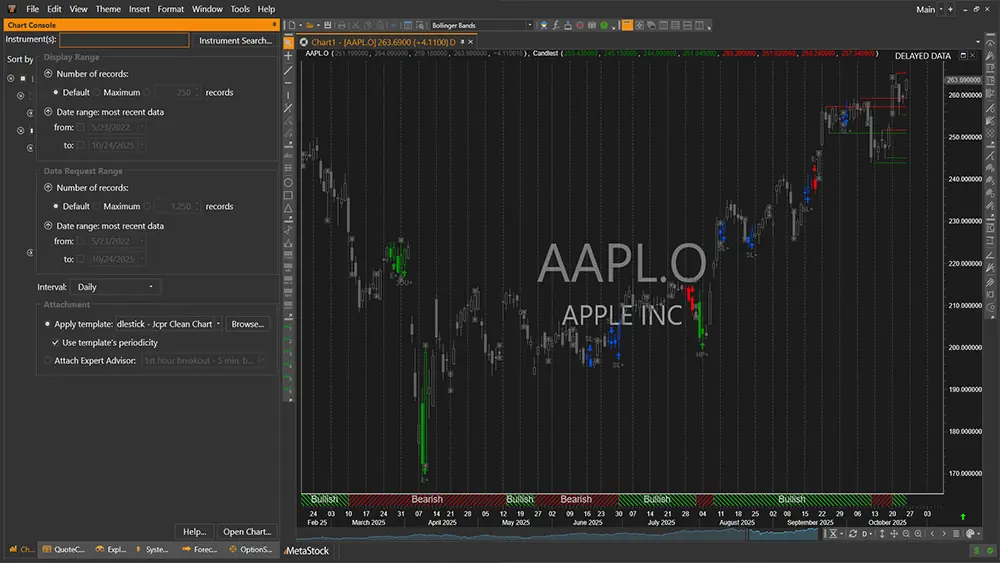
Your only job in step 1: open the Power Console, find where charts, the Explorer and the System Tester live, and close the program again. Knowing the map before you need it is what makes the later steps feel easy.

Step 2
MetaStock without data is a very nice empty grid. The software is designed around MetaStock's own feeds: DataLink for end-of-day data and XENITH for real-time prices, news and fundamentals. During signup you connect a data subscription, and once it is connected MetaStock pulls prices on demand: type a symbol, get a chart, no manual downloading ritual required.
Data is its own topic with its own costs, and the market data guide walks through the 2026 options and indicative pricing properly. For this step, the test is simple: open a chart of a liquid stock you know, and confirm the recent price matches reality. When it does, your pipeline works.
Step 3
Open a chart and make it yours: pick a style (candlesticks, if you want our vote), drop on a moving average or two, add volume. MetaStock's interface is object-oriented, which in practice means you click directly on the thing you want to change: click a price plot to restyle it, drag an indicator from one chart onto another, right-click anything for its menu.
Then learn the two features that save you rebuilding this every morning:
Ten minutes spent here pays back every single session. Our charting deep-dive covers the rest of what the chart window can do.
Step 4
This is the moment MetaStock stops being a chart viewer. The Explorer scans your whole securities list for conditions you define: stocks crossing above their 200-day moving average, RSI leaving oversold, volume spiking above average, whatever your method cares about. Run an exploration and you get back a shortlist worth charting, instead of flicking through hundreds of symbols by hand.
Start with one of the built-in explorations to see the mechanics, then modify a copy of it. Writing scans of your own is a formula language skill, which is exactly why the formula course is the next step after this guide.
Step 5
MetaStock ships with 58 built-in Expert Advisors: packaged interpretations of well-known trading approaches from names like Martin Pring and Bill Williams. Attach one to a chart and it annotates the price action with its signals and commentary, right on the bars.
Treat them as an education, not an oracle. Watching how a respected approach reads the same chart you are reading is one of the fastest ways to train your eye. The Expert Advisor page covers how they work and how to go beyond the built-ins.
Step 6
The System Tester is where opinions go to be checked. Give it entry and exit rules, point it at historical data, and it reports how the strategy would have fared: profit, drawdown, win rate, trade by trade. It simulates the unglamorous details too, order sizes and commissions included, which is what separates a real test from a hopeful one.
In your first month, run one built-in system over a portfolio of stocks you know, and read the report properly. You are not looking for a holy grail; you are learning what a strategy report looks like so that later, when you test your own rules, the numbers mean something.
The habit
Confidence with MetaStock is mostly repetition. For an end-of-day trader, the routine looks like this: after the close, open your layout, run your exploration, chart the handful of candidates it returns, check any open positions against your exit rules, and write down tomorrow's orders. Twenty minutes, same order, every day. The software fades into the background, which is the point.
Then, when the routine feels automatic, learn the skill that multiplies all of it: the formula language behind the Indicator Builder, the Explorer and the System Tester. The free nine-lesson formula course takes you from zero to writing your own indicators and scans. Questions along the way usually have plain answers in the MetaStock FAQ.
The trial is the full version: every step above works from day one. Install it, follow the six steps, and decide with evidence.
Start Your Free 30-Day Trial →30-DAY TRIAL · FULL VERSION · CANCEL ANYTIME · AFFILIATE LINK, SAME PRICE FOR YOU